> ## Documentation Index
> Fetch the complete documentation index at: https://docs.relay.link/llms.txt
> Use this file to discover all available pages before exploring further.
# Quickstart
> Execute your first cross-chain transaction in under 5 minutes.
Relay is a multichain payments network. You define the **Intent** (what the user wants), and Relay handles the **Execution** (how to get there).
Follow this 5-step flow to integrate Relay into your application:
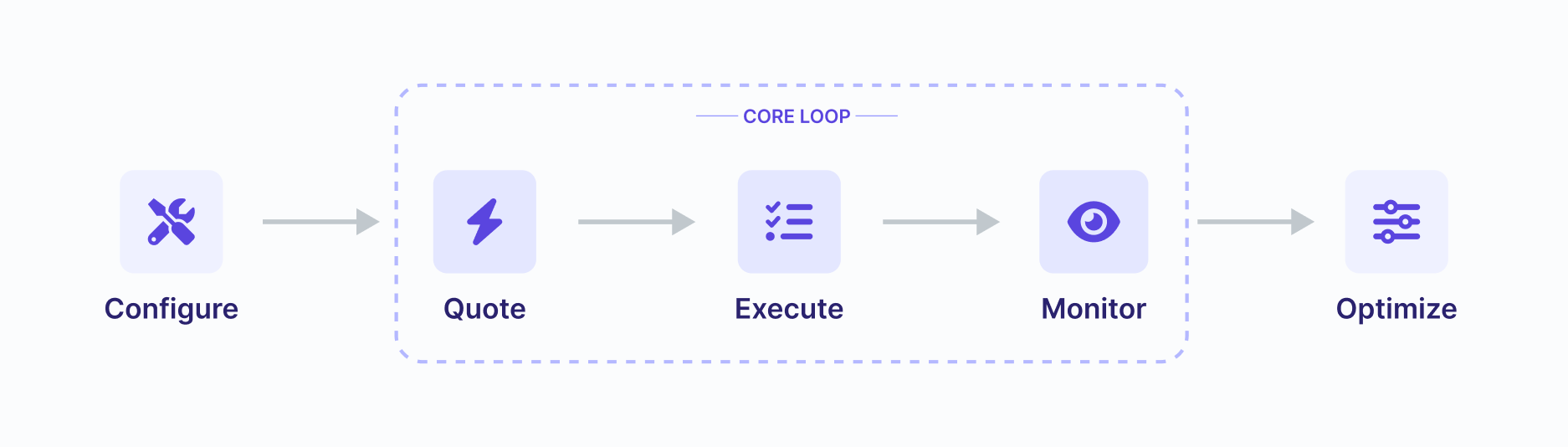 To see how fast and simple Relay makes transacting cross-chain, let’s bridge real assets between inexpensive L2s—Base and Arbitrum.
**Prerequisites:**
* **Base URL:** `https://api.relay.link`
* **Environment:** Node.js installed
* **Wallet:** An EOA with a small amount of ETH (\~\$2.00 USD equivalent) on Base
### API key Provisioning
You can find a self-serve form to request API keys [here](/references/api/api-keys#how-to-get-an-api-key).
To see how fast and simple Relay makes transacting cross-chain, let’s bridge real assets between inexpensive L2s—Base and Arbitrum.
**Prerequisites:**
* **Base URL:** `https://api.relay.link`
* **Environment:** Node.js installed
* **Wallet:** An EOA with a small amount of ETH (\~\$2.00 USD equivalent) on Base
### API key Provisioning
You can find a self-serve form to request API keys [here](/references/api/api-keys#how-to-get-an-api-key).
Having an API key will allow you to use the API at a higher rate limit.
## Chain Configuration
For chain metadata we recommend querying the [chains API](/references/api/get-chains) in your application. This will return some valuable information about the chain, we've provided a sample below:
```json Response expandable highlight={3,12,14,74} theme={null}
{
"chains": [{
"id":10,
"name":"optimism",
"displayName":"Optimism",
"httpRpcUrl":"https://optimism.publicnode.com",
"wsRpcUrl":"wss://optimism.publicnode.com",
"explorerUrl":"https://optimistic.etherscan.io",
"explorerName":"Optimism Etherscan",
"depositEnabled":true,
"tokenSupport":"All",
"disabled":false,
"partialDisableLimit":0,
"blockProductionLagging":false,
"currency":{
"id":"eth",
"symbol":"ETH",
"name":"Ether",
"address":"0x0000000000000000000000000000000000000000",
"decimals":18,
"supportsBridging":true
},
"withdrawalFee":1,
"depositFee":0,
"surgeEnabled":false,
"featuredTokens":[
{
"id":"eth",
"symbol":"ETH",
"name":"Ether",
"address":"0x0000000000000000000000000000000000000000",
"decimals":18,
"supportsBridging":true,
"metadata":{
"logoURI":"https://assets.relay.link/icons/1/light.png"
}
}
],
"erc20Currencies":[
{
"id":"sipher",
"symbol":"SIPHER",
"name":"Sipher",
"address":"0xb94944669f7967e16588e55ac41be0d5ef399dcd",
"decimals":18,
"supportsBridging":true,
"withdrawalFee":1,
"depositFee":0,
"surgeEnabled":false
}
],
"solverCurrencies":[
{
"id":"sipher",
"symbol":"SIPHER",
"name":"Sipher",
"address":"0xb94944669f7967e16588e55ac41be0d5ef399dcd",
"decimals":18
},
],
"iconUrl":"https://assets.relay.link/icons/10/light.png",
"contracts":{
"multicall3":"0xca11bde05977b3631167028862be2a173976ca11",
"multicaller":"0x0000000000002bdbf1bf3279983603ec279cc6df",
"onlyOwnerMulticaller":"0xb90ed4c123843cbfd66b11411ee7694ef37e6e72",
"relayReceiver":"0xa5f565650890fba1824ee0f21ebbbf660a179934",
"erc20Router":"0xf5042e6ffac5a625d4e7848e0b01373d8eb9e222",
"approvalProxy":"0xbbbfd134e9b44bfb5123898ba36b01de7ab93d98",
"v3":{
"erc20Router":"0xb92fe925dc43a0ecde6c8b1a2709c170ec4fff4f",
"approvalProxy":"0xccc88a9d1b4ed6b0eaba998850414b24f1c315be"
}
},
"vmType":"evm",
"baseChainId":1,
"solverAddresses":[
"0xf70da97812cb96acdf810712aa562db8dfa3dbef"
],
"tags":[],
"protocol":{
"v2":{
"chainId":"optimism",
"depository":"0x4cd00e387622c35bddb9b4c962c136462338bc31"
}
}
}]
}
```
```json Request theme={null}
curl -X GET "https://api.relay.link/chains"
```
The endpoint exposes a vast amount of chain metadata but the important things to note are:
* `vmType`: This is the type of virtual machine that the chain uses (SVM, EVM, BVM, etc).
* `id`: This is the chain id of the chain. Some chains like Bitcoin/Solana/Tron have a custom id that the Relay team chose upon deployment.
* `disabled`: This is a boolean that indicates if the chain is disabled. When incidents arise we may disable a chain to prevent users from interacting with it.
* `blockProductionLagging`: This boolean indicates if the chain is lagging in block production. You can use this to let your users know about degraded Relay performance in real time.
Every action in Relay starts with a Quote.
The [quote endpoint](/references/api/get-quote-v2) handles all of your use cases, whether it’s a [**bridge**](/use-cases/bridging), [**swap**](/use-cases/cross-chain-swaps), or [**cross-chain call**](/use-cases/calling). It calculates fees, finds the best route, and generates the transaction data.
## **Request**
As an example, let’s consider the scenario of bridging 0.0001 ETH from Base (Chain ID 8453) to Arbitrum One (Chain ID 42161):
*Note: the `requestId` will be unique to every request.*
```bash Request theme={null}
curl -X POST "https://api.relay.link/quote/v2" \
-H "Content-Type: application/json" \
-d '{
"user": "YOUR_WALLET_ADDRESS",
"originChainId": 8453,
"destinationChainId": 42161,
"originCurrency": "0x0000000000000000000000000000000000000000",
"destinationCurrency": "0x0000000000000000000000000000000000000000",
"amount": "100000000000000",
"tradeType": "EXACT_INPUT"
}'
```
```json Response expandable theme={null}
{
"steps": [
{
"id": "deposit",
"action": "Confirm transaction in your wallet",
"description": "Deposit funds to the relayer to execute the bridge",
"kind": "transaction",
"requestId": "0x8a9b3c...",
"items": [
{
"status": "incomplete",
"data": {
"from": "YOUR_WALLET_ADDRESS",
"to": "0xf70da97812cb96acdf810712aa562db8dfa3dbef",
"data": "0x00fad611...",
"value": "100000000000000",
"chainId": 8453,
"gas": "150000",
"maxFeePerGas": "100000000",
"maxPriorityFeePerGas": "100000000"
},
"check": {
"endpoint": "/intents/status?requestId=0x8a9b3c...",
"method": "GET"
}
}
],
"depositAddress": ""
}
],
# ...
"fees": {
"gas": {
"amount": "21000",
"currency": {
"chainId": 8453,
"address": "0x0000000000000000000000000000000000000000",
"symbol": "ETH",
"name": "Ether",
"decimals": 18
},
"amountUsd": "0.01"
},
"relayer": {
"amount": "5000000000000",
"currency": {
"chainId": 8453,
"address": "0x0000000000000000000000000000000000000000",
"symbol": "ETH",
"name": "Ether",
"decimals": 18
},
"amountUsd": "0.02"
}
},
"details": {
"operation": "bridge",
"sender": "YOUR_WALLET_ADDRESS",
"recipient": "YOUR_WALLET_ADDRESS",
"timeEstimate": 15,
"currencyIn": {
"amount": "100000000000000",
"currency": {
"chainId": 8453,
"address": "0x0000000000000000000000000000000000000000",
"symbol": "ETH",
"decimals": 18
}
},
"currencyOut": {
"amount": "95000000000000",
"currency": {
"chainId": 42161,
"address": "0x0000000000000000000000000000000000000000",
"symbol": "ETH",
"decimals": 18
}
},
"totalImpact": {
"usd": "-0.02",
"percent": "-0.50"
},
"rate": "0.95"
}
}
```
The [quote endpoint](/references/api/get-quote-v2) returns a `steps` array. Think of this as a recipe your application must follow. You need to iterate through these steps and prompt the user to sign or submit them.
### Deep Dive
For the full logic on parsing steps, see [**Understanding Step Execution**](/references/api/api_core_concepts/step-execution).
## The Logic
For a simple ETH bridge, the `steps` array contains a single transaction item. To execute it:
* **Check the Step Kind:** Identify if the step is a `transaction` (submit to chain) or a `signature` (sign off-chain).
* **Execute:** For transactions, submit the provided `data`, `to`, `value`, and `chainId` using the user's wallet. For signatures, follow the `signatureKind` provided in the step item to sign the `message`.
## The Script (Node.js / Viem example)
Copy the script below to execute the transaction returned by the Quote in Step 2. You'll need to add the wallet connection logic using your preferred provider.
```typescript expandable theme={null}
// npm install viem
import { createWalletClient, http } from 'viem';
import { privateKeyToAccount } from 'viem/accounts';
import { base } from 'viem/chains';
// 1. Setup Wallet (Base)
//Initialize your wallet using a provider or your preferred method
const account = {}
const client = createWalletClient({
account,
chain: base,
transport: http()
});
// 2. The Quote from Step 2 (Paste JSON response)
const quote = { /* PASTE_FULL_JSON_RESPONSE_HERE */ };
async function execute() {
console.log("🚀 Starting Execution...");
// Iterate through steps (usually just 1 for ETH bridge)
for (const step of quote.steps) {
//Although there is an array of items, you can safely select the first item
//as there is just one returned
const item = step.items[0]
if (step.kind === 'transaction') {
console.log(`Submitting Transaction...`);
// 3. Send Transaction
const hash = await client.sendTransaction({
to: item.data.to,
data: item.data.data,
value: BigInt(item.data.value),
chain: base
});
//4. Optional but you may want to wait for the transaction receipt
//to ensure that the origin transaction was successfully submitted.
console.log(`✅ Bridge Initiated: ${hash}`);
console.log(`requestId: ${step.requestId}`); // Save this for Step 4!
}
}
}
execute();
```
Once you submit the transaction, the Relay Solver detects the deposit and fills the request on the destination chain.
Use the [status endpoint](/references/api/get-intents-status-v3) with the `requestId` located inside each step object in your [quote response](/references/api/quickstart#request) to track status and confirm success. You can also use the `check.endpoint` property inside the step item object as the endpoint for checking the status of the request.
*Note: Replace with the requestId returned in your quote*
```bash Request theme={null}
curl "https://api.relay.link/intents/status/v3?requestId=0x20538510fd9eab7a90c3e54418f8f477bfef24d83c11955a8ca835e6154b59d3"
```
```json Response theme={null}
{
"status": "success",
"inTxHashes": [
"0x9421772820b92c239162341a17994b4ad8706c974af2ebf88084a1b3b614d328"
],
"txHashes": [
"0xef2a71eb2ddd952b31f7b552e133d3af048e4be30a568f2bea54a36d8f3b12cd"
],
"updatedAt": 1767385462193,
"originChainId": 8453,
"destinationChainId": 56
}
```
Poll this endpoint once per second. For a real-time status stream you can subscribe to Relay’s [**websocket server**](/references/api/api_guides/websockets).
## Status Lifecycle
The diagram below illustrates the journey of a cross-chain transaction through Relay's infrastructure and the corresponding API statuses. Below are descriptions for each status. Refer to the [Get Status](/references/api/get-intents-status-v3) endpoint for a full list of statuses and what they mean.
* `waiting`: The user is submitting or has submitted the deposit transaction to the Relay Depository contract on the origin chain, but it has not yet been indexed by the system.
* `depositing`: The origin chain deposit has been confirmed via the /execute API. The system is preparing to fill on the destination chain.
* `pending`: The deposit was successfully indexed. The Relay Solver is now monitoring the request and preparing the fill transaction on the destination chain.
* `success`: The Relay Solver successfully executed the "Fill Tx", and the funds have reached the recipient.
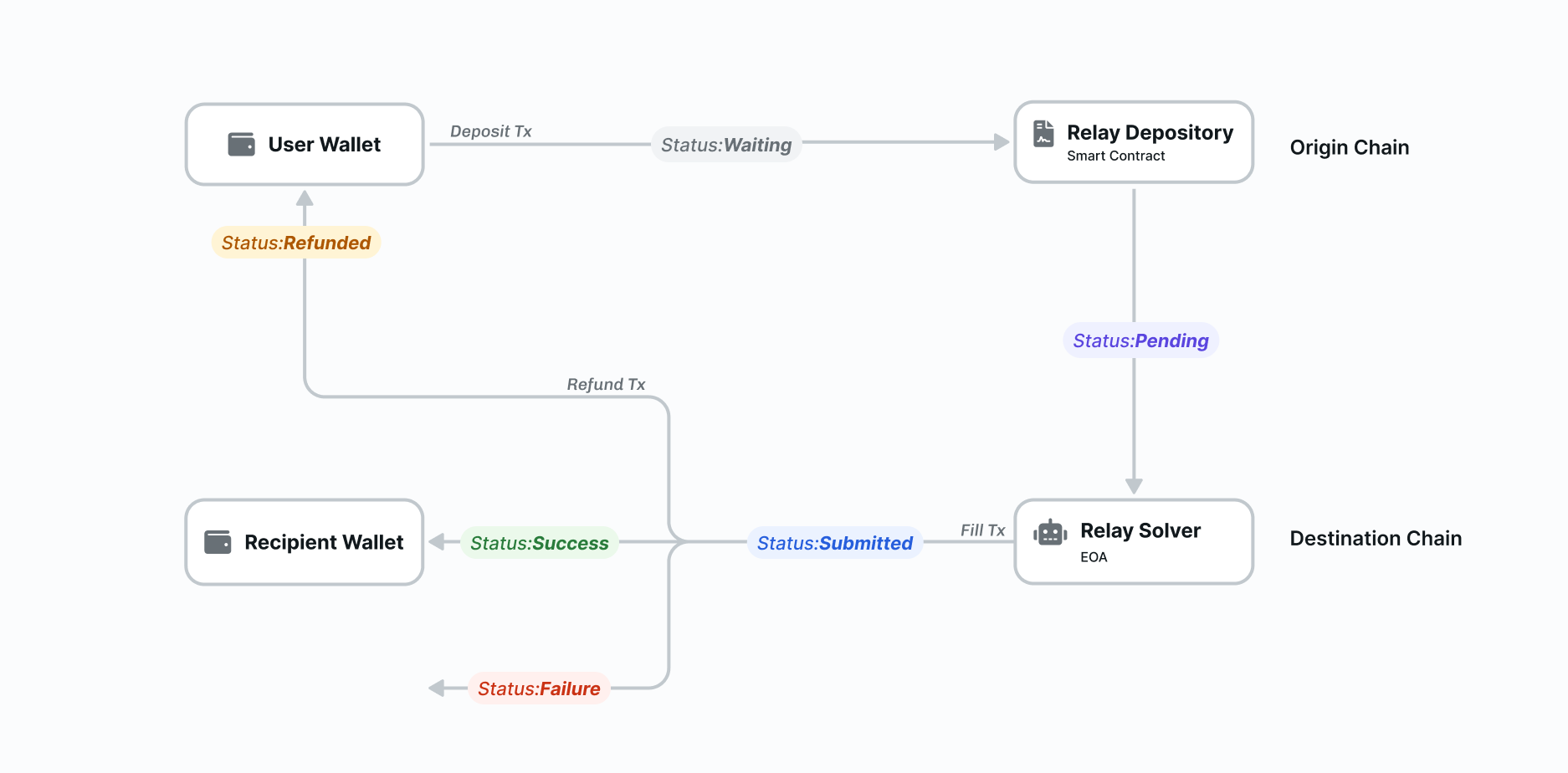 The diagram also depicts paths where a transaction may end up in a failure or refund state if the fill cannot be completed. Learn more about how Relay helps you handle [refunds](https://docs.relay.link/references/api/api_core_concepts/refunds).
You have successfully executed your first cross-chain transaction with Relay!
Check out some of the advanced features we offer to customize the experience:
* [**App Fees**](/features/app-fees): Monetize your integration by adding a fee (in bps) to every quote. Revenue is collected automatically in USDC.
* [**Smart Accounts**](/references/api/api_guides/smart_accounts/smart-accounts): Use [ERC-4337](/references/api/api_guides/smart_accounts/erc-4337) and [EIP-7702](/references/api/api_guides/smart_accounts/eip-7702) to enable *Gas Sponsorship* and *Atomic Batching* (e.g., Approve + Swap in one click).
* [**Transaction Indexing**](/references/api/api_guides/transaction-indexing): Handle complex settlement scenarios, like tracking complex same-chain wraps or transfers.
***
## Try it in a Sandbox
Experiment with the Quickstart code in our [interactive sandbox](https://codesandbox.io/p/sandbox/github/GiselleNessi/relay-demo). You can fork or clone it to build your own project with Relay.
### See Also
* [**Bridging & Onboarding**](/use-cases/bridging): Learn more about instant cross-chain deposits and withdrawals.
* [**Swaps**](/use-cases/cross-chain-swaps): Combine bridging with DEX meta-aggregation for any-to-any token swaps.
* [**Call Execution**](/use-cases/calling): Execute arbitrary transactions on any chain, paying with any token.
The diagram also depicts paths where a transaction may end up in a failure or refund state if the fill cannot be completed. Learn more about how Relay helps you handle [refunds](https://docs.relay.link/references/api/api_core_concepts/refunds).
You have successfully executed your first cross-chain transaction with Relay!
Check out some of the advanced features we offer to customize the experience:
* [**App Fees**](/features/app-fees): Monetize your integration by adding a fee (in bps) to every quote. Revenue is collected automatically in USDC.
* [**Smart Accounts**](/references/api/api_guides/smart_accounts/smart-accounts): Use [ERC-4337](/references/api/api_guides/smart_accounts/erc-4337) and [EIP-7702](/references/api/api_guides/smart_accounts/eip-7702) to enable *Gas Sponsorship* and *Atomic Batching* (e.g., Approve + Swap in one click).
* [**Transaction Indexing**](/references/api/api_guides/transaction-indexing): Handle complex settlement scenarios, like tracking complex same-chain wraps or transfers.
***
## Try it in a Sandbox
Experiment with the Quickstart code in our [interactive sandbox](https://codesandbox.io/p/sandbox/github/GiselleNessi/relay-demo). You can fork or clone it to build your own project with Relay.
### See Also
* [**Bridging & Onboarding**](/use-cases/bridging): Learn more about instant cross-chain deposits and withdrawals.
* [**Swaps**](/use-cases/cross-chain-swaps): Combine bridging with DEX meta-aggregation for any-to-any token swaps.
* [**Call Execution**](/use-cases/calling): Execute arbitrary transactions on any chain, paying with any token.